
In marketing it's easy to fall into a repetitive rut, where you follow the same structure for your email campaigns every time. The worst is when you want to try new things to get your stats up but you don't know where to start. So you default back to what's been working well enough. This blog is strictly new-to-the-industry actionable items, accumulated from industry experts.
Here's the shift that reframes the whole channel. Before your recipient reads a word you wrote, an AI has often already read your email, summarized it, and decided what they see first. Gmail, Apple Mail, and Outlook are all doing this now. So the game isn't just "write a good email" anymore. It's "write an email the AI understands and represents correctly," because the AI is now your first reader and, increasingly, your first impression.
Nearly every item below is backed by real experiment data, from industry experts, not general "best practices." A lot of it comes from Jay Schwedelson, who shared a mountain of testing data at HubSpot's event Unbound 2026, so where a stat is his firm's (Worldata) research, I've said so. Unless noted otherwise, the data below comes from that Worldata research.
Before the list, here's a real example Jay shared that stuck with me. This TikTok for Business email is flat-out ugly. No design, no polish, just five nearly identical red links stacked on top of each other like a ransom note. It's the kind of email you'd swear some intern sent out by mistake. But it worked well, and the reason is the whole point of this post: it wasn't built to impress your eye, it was built for the way AI reads email. We get into the mechanics behind it below.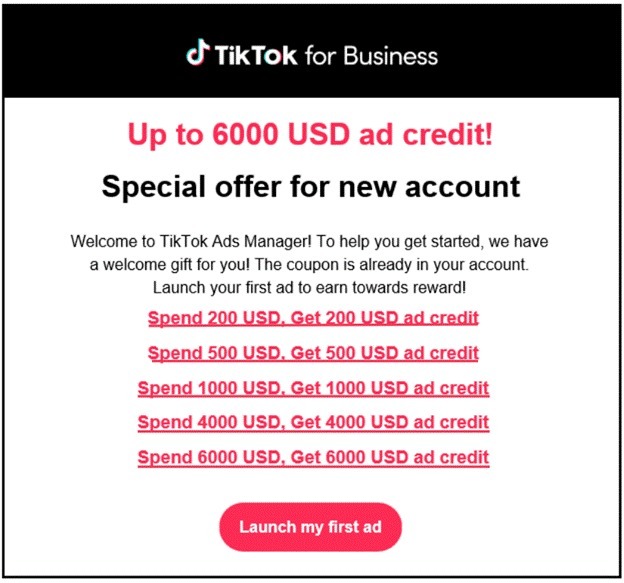
Is an AI deciding what your email says before anyone reads it?
Yes, and that's the single biggest change to email in years. The major inboxes now generate an AI summary of your email that the recipient sees before (or instead of) opening the full thing.
And the problem is 64% of these AI summaries misrepresent the original message. So 2 out of 3 times the "version" of your email the recipient meets first was wrong.
Why it matters: You've lost some control over your own message. If the AI pulls the wrong line, buries your offer, or garbles your point, that's what your reader reacts to, not what you actually wrote.
Where does the AI actually look in your email?
In the first ~200 characters, as live text. Put your core "Action + Product + Deadline" right at the top, because that's the part the AI reads and pulls from when it builds its summary. Bury your offer three paragraphs down and the AI may never surface it. Look back at that TikTok email, the "Up to 6000 USD ad credit" line sits dead at the top, in plain text, exactly where the AI looks first.
Why it matters: Email click-throughs rose 19% when "Action + Product + Deadline" appeared inside the first 200 live-text characters. You're not just writing for the reader's attention span anymore, you're feeding the AI the right information in the spot it actually looks.
What format does the inbox AI pull from most?
Bullets. When an inbox AI builds its summary, it pulls heavily from bulleted content, more than any other format. The rates shared: 92% of the time for Microsoft Copilot, 84% for Apple Mail, and 77% for Gmail.
Why it matters: Those are all big percentages. Bullets are close to a direct line into what the recipient sees in the AI summary. If there's a point you absolutely need to survive the AI's summarizing, putting it in a bullet dramatically raises the odds it makes the cut. Those stacked offer lines in the TikTok email work the same way, each one is its own scannable, extractable chunk.
Should you be rotating your email formats?
Yes, and this one surprised me. Rotating your email formats (a polished HTML template one send, a plain-text letter the next, a digest, a short personal note) beats sending everything in the same house template. The more formats in the rotation, the better it performed.
Why it matters: Click-through rose steadily with format variety, up to 104% higher at four rotating formats versus a single template. Variety fights inbox fatigue, and the format itself becomes a lever you can pull rather than a fixed cost.
How many times should you make your ask?
More than once, worded differently each time. Instead of a single call-to-action button, repeat the same offer in different words across the email, a text link, a button, a P.S. Same destination, different phrasing.
Why it matters: Click rate climbed with repetition, up to 22% higher at five differently worded CTAs versus the usual one or two. Most emails ask once and lose everyone who wasn't ready at that exact line. The TikTok email repeated its offer five times as escalating tiers, ugly, but every reader hit the ask at least once.
Can a tiny design cue really lift clicks?
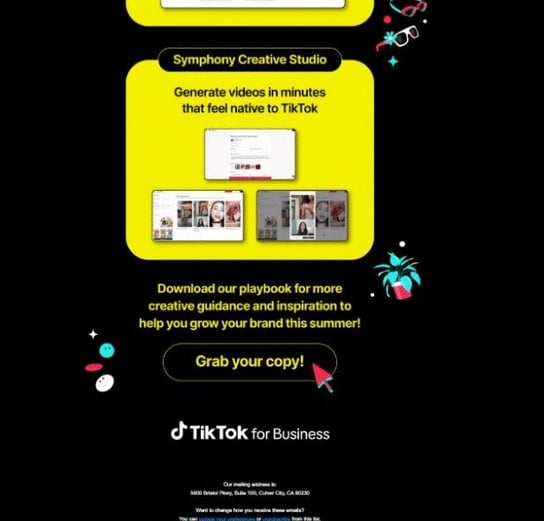
It can. Pairing your CTA with a directional visual cue, a simple arrow or a bit of motion pointing at the button, lifts clicks over a standalone button. Jay called it "the arrow effect."
Why it matters: Directional cues drove a 14% lift in clicks versus a plain button. The human eye follows direction, so a small, free design tweak captures clicks that were already on the table.
How do you get more clicks on an email video?
Put a play button on it. When you're featuring video content, a play-button triangle overlaid on the thumbnail beats simply describing or linking the video in text.
Why it matters: The play-button visual drove a 34% higher click-through than a text description of the same video. That triangle is one of the most conditioned "click me" cues on the internet, and using it is effectively free.
Should you send less to "respect the inbox"?
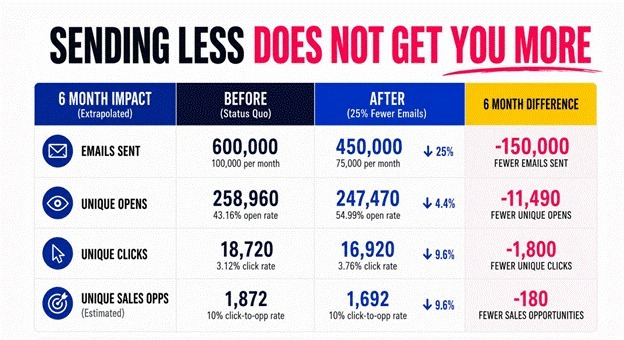
No. It sounds responsible, but it quietly shrinks your results. Jay modeled what happens when you cut email volume 25% over six months. Here are the results:
- 11,490 fewer opens
- 1,800 fewer clicks
- 180 fewer sales opportunities (estimated)
Fewer sends, fewer people reached, fewer results. Full stop.
Why it matters: "Send less, but better" feels like the mature choice, and it costs you pipeline. Frequency and relevance work together. The answer is to make the sends better, not to make fewer of them.
How do you know the AI will summarize your email correctly?
Test it before you send. This was one of my favorite takeaways, because it turns all of the above into something you can actually check. Paste your drafted email into an AI and have it role-play the inbox summarizers, then see whether your key information survives. If it doesn't, rewrite the top of the email until it does.
Here's the prompt Jay shared for it:
I am pasting an email. Pretend you are Gmail, Apple Mail, and Outlook Copilot. For each platform, write the 1-sentence summary most likely to appear before the email is opened. Then score whether the summary preserves: OFFER, AUDIENCE, BENEFIT, DEADLINE, CTA. Rewrite ONLY the first 200 live-text characters until all 5 survive. Do not make the copy prettier. Make it impossible to misunderstand.
Why it matters: Given that 64% of AI summaries get it wrong, this is the difference between hoping the AI represents you correctly and knowing it does. With a 5 minute check you can prevent misrepresentation to your entire list
Which words make your copy read like a robot wrote it?
When certain overused "AI-sounding" words show up in the first three words of your subject line, engagement drops measurably. Here are the 20 he flagged, with how far each one dropped email open rates when it led the subject:
|
# |
Word |
Email Open Rate |
|
1 |
unlock |
-18% |
|
2 |
discover |
-16% |
|
3 |
revolutionary |
-22% |
|
4 |
game-changing |
-24% |
|
5 |
next generation |
-20% |
|
6 |
cutting edge |
-19% |
|
7 |
leverage |
-17% |
|
8 |
harness |
-16% |
|
9 |
maximize |
-18% |
|
10 |
optimize |
-17% |
|
11 |
streamline |
-15% |
|
12 |
effortless |
-21% |
|
13 |
powerful |
-14% |
|
14 |
innovative |
-18% |
|
15 |
seamless |
-16% |
|
16 |
transform |
-19% |
|
17 |
elevate |
-17% |
|
18 |
ultimate |
-15% |
|
19 |
exclusive |
-13% |
|
20 |
limited time |
-12% |
Why it matters: In an inbox full of AI-generated copy, sounding human is the differentiator, and these words signal the opposite. The fix isn't just deleting them, it's replacing them with something specific and real. A concrete detail or a genuine point of view is the hardest thing for AI to fake, which is exactly why it stands out.
The one-line takeaway
Your email now has two audiences: the person and the AI that summarizes it for them. Write for both. Put your real offer in live text near the top, use bullets, vary your format, ask more than once, and test how the AI represents you before you send. The teams that adapt to the AI-first inbox will keep connecting, while everyone else wonders why their emails feel invisible.
Other pieces in this series
Part 1: Updates on How to Get Cited by AI: Field Notes from Unbound 2026
Personal note
I love writing content like this. I try to write the kind of thing that, if I stumbled across it in my own LinkedIn feed, would actually give me something to try that affects my everyday work. If it helped you, I'd genuinely like to hear about it. Like it, leave a comment, and follow me on LinkedIn for more.
